Miop demo notebook
This notebook serves as a demo for reconstruction from SEM images using miop. The demo images are available in the GitHub repository, users can modify the notebook for their needs.
[1]:
from miop import *
from pipeline import *

import os
from torch import cuda, device
import numpy as np
import matplotlib.pyplot as plt
import open3d as o3d
Jupyter environment detected. Enabling Open3D WebVisualizer.
[Open3D INFO] WebRTC GUI backend enabled.
[Open3D INFO] WebRTCWindowSystem: HTTP handshake server disabled.
Data input
Set paths to microscope images
[10]:
dpath = "../assets/images/demo_images/"
filenames = [
    "cement_00deg.tif",
    "cement_05deg.tif",
    "cement_10deg.tif",
]

filenames = list(map(lambda s: os.path.join(dpath, s), filenames))
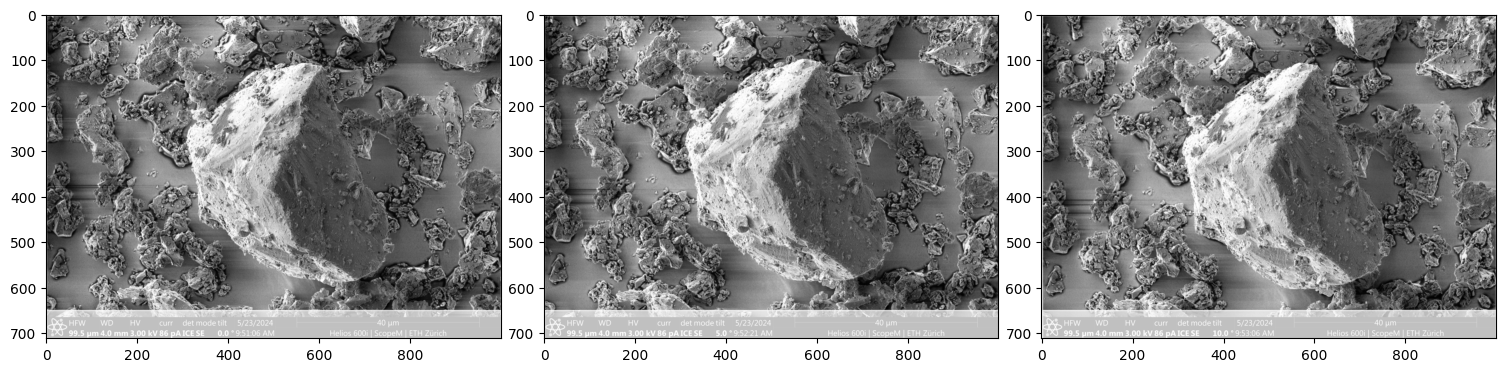
Images pre-processing and definition of ImageCollection
Crop and downsample the original images
Handle microscope metadata if available. If not, custom metadata can be defined.
Utility to crop images (crop_utility=True in the show method). White regions are cropped out.
Define ImageCollection, which serves as input to the reconstruction pipeline.
[11]:
# set width (dim_x) height (dim_y) of the cropped image
dim_x = 1000
dim_y = 650

# set coordinates of the top left corner in the original image
top_left_x = 0
top_left_y = 0

# set max resolution
max_res = 800

# custom metadata (if no microscope metadata available) -- one dictionary per image
metadata_dict = [{"stage_tilt_deg":0, "stage_rotation_deg":0, "tilt_axis":[1,0,0]},
                 {"stage_tilt_deg":5, "stage_rotation_deg":0, "tilt_axis":[1,0,0]},
                 {"stage_tilt_deg":10, "stage_rotation_deg":0, "tilt_axis":[1,0,0]},
                ]

# define image collection and crop images
img_collection = ImageCollection(metadata_type='custom',
                                 metadata=metadata_dict,
                                 crop_dim=[[dim_x, dim_y],[top_left_x, top_left_y]],
                                 max_dim=(max_res, max_res))

# show cropped images
img_collection.eval(filenames).show(crop_utility=True)
Reconstruction with metadata available
Execute the following cells if the tilt angles, stage rotations, and tilt axes are known for your input images.
Define pipeline components
[17]:
# recover camera movements (matrices) from metadata
mat_from_metadata = CameraMvmtFromMetadata()

# compute feature matching
dense = DenseRoma(tiny=True, num_matches=5000)

# reconstruct point clouds
rec = Reconstruction()

# align reconstructed point clouds
reg = RegistrationByICP()

# mesh reconstruction from point cloud
surface_rec = PoissonSurfaceReconstruction(depth=7)
Define order of execution
After defining the pipeline components, their order of execution must be specified. The scheme below illustrates the order of execution for reconstruction with metadata available.

[18]:
# note: the order of inputs passed to rec must be (camera_positions, matches)
mat_from_metadata >> rec >> reg >> surface_rec
dense >> rec
[18]:
<miop.reconstruction.Reconstruction at 0x7f0b2146fed0>
Build pipeline
The pipeline object is defined based on the start_node and end_node.
[19]:
# build pipeline as DAG(start_node, end_node)
pipeline = DAG([mat_from_metadata,dense], surface_rec)
Execute pipeline
The pipeline is executed with the ImageCollection as input and outputs a reconstructed mesh.
[20]:
# execute pipeline
mesh = pipeline.execute(img_collection)
Start of RoMa feature matching..., tiny=True
Using cache found in /home/maxime/.cache/torch/hub/verlab_accelerated_features_main
End of RoMa feature matching
Start of Poisson Reconstruction...
End of Poisson Reconstruction.
Reconstruction without metadata available
Execute the following cells if the tilt angles, stage rotations, and tilt axes are unknown for your input images.
[8]:
# define pipeline components

# compute feature matching
dense = DenseRoma(tiny=False, num_matches=5000)

# interpolate matches to a disparity map
inter = Interpolate()

# track corresponding points across image set (compute measurement matrix W)
corresp = CorrespondingPointsFromDisparity()

# factorize measurement matrix W to recover camera movements
fac = Factorization(1., 0, max_matches=10000, batch_size=4)

# reconstruct point clouds
rec = Reconstruction()

# align reconstructed point clouds
reg = RegistrationByICP()

# mesh reconstruction from point cloud
surface_rec = PoissonSurfaceReconstruction(depth=7)
[ ]:
# define order of execution
dense >> inter >> corresp >> fac >> rec >> reg >> surface_rec
dense >> rec
[ ]:
# build pipeline as DAG(starting_node, ending_node)
pipeline = DAG(dense, surface_rec)
[ ]:
# execute pipeline
mesh = pipeline.execute(img_collection)
Display intermediary results
[ ]:
# show image collection
img_collection.show(crop_utility=False)
[ ]:
# show feature matching
dense.show((0,0), 100)
[ ]:
# show reconstructed point cloud
rec.show(face=0)
# rec.save("my_pcd.npy")
[ ]:
# show aligned point clouds
reg.show()
# reg.save("my_pcd.ply")
[ ]:
# show reconstructed mesh
surface_rec.show()
# surface_rec.save("my_mesh.ply")